
now boarding
ABOUT OUR DSL

Describe your system the way you think about it.

Basalt is a small declarative language for network, OT and cloud architecture. You write zones, devices and the conduits between them in plain text — Basalt turns it into a living, versionable diagram of your architecture.

Explore the language ↓code canvas — live
factory.bslt
zone "Enterprise Network" [level: 4-5, color: blue] {
ERP System [icon: sap-erp]
Corporate Firewall [icon: cisco-fw]
}
zone "Industrial DMZ" [level: dmz, color: orange] {
Historian Mirror [icon: historian]
}
zone "Control Network" [level: 2-3, color: purple] {
SCADA Server [icon: scada]
}
 
Corporate Firewall > DMZ Firewall [firewall, conduit: HTTPS:443]
SCADA Server > Main PLC [conduit: EtherNet/IP:44818]
01 ZONES

Zones draw the boundaries.

A zone is the top-level container of a Basalt file — a network segment, a security tier, a cloud account. Everything you declare lives inside one, and Basalt renders each zone as a distinct region with its own color and border. Add [level:] for the Purdue hierarchy — 0 is the physical process, 5 is the enterprise.

// a zone per trust boundary
zone "Enterprise Network" [level: 4-5, color: blue] {
ERP System [icon: sap-erp]
Corporate Firewall [icon: cisco-fw]
}
 
zone "Industrial DMZ" [level: dmz, color: orange] {
Historian Mirror [icon: historian]
}
solid ground
LAYERED, LIKE STRATA
Zones stack and never overlap — Purdue levels render as clean horizontal bands, enterprise at the top, process at the bottom.
level
Purdue level 0–5, a range like 4-5, or dmz. Drives the level banding on the canvas — the attribute generic tools don’t have.
color
blue = IT, orange = DMZ, purple = control, green = field, yellow = devices. Nodes inside inherit the tint.
group
Same syntax, minus the level — for cloud accounts or logical clusters that don’t sit on the Purdue ladder.
02 CELLS

Nest structure inside structure.

A cell is a process area inside a zone — an assembly line, a plant subsystem. Where zones are network tiers, cells group what’s physically together: a local controller plus the sensors and actuators around it.
zone "Field Network" [level: 1, color: green] {
Main PLC [icon: allen-bradley]
cell "Assembly Line" {
Assembly PLC [icon: plc]
Assembly Robot Controller [icon: robot-controller]
Assembly Sensors [icon: sensor]
}
}
Process areas, not tiers
A cell is everything physically on the line — as opposed to a zone, which is a network or security boundary. Two zones can each have their own “Welding” cell; Basalt keeps them distinct.
Fully wired in
Cell devices connect cleanly up to the broader field network — a local controller’s traffic flows out to the rest of the diagram, no isolated islands.
nests all the way down
03 EDGES

Edges are the story.

An edge is a directed connection between two nodes — a call, a stream, a control link. Direction is part of the syntax: source > target, and the arrowhead lands on the target. Edges cross zones freely — that top-to-bottom flow is the whole point of a correct diagram.

two nodes, one stream
EVERY PATH, TRACED
Basalt routes edges around zones automatically — orthogonal, obstacle-avoiding, no manual waypoints.
Corporate Firewall > DMZ Firewall [firewall, conduit: HTTPS:443]
DMZ Firewall > SCADA Server [firewall, conduit: OPC-UA:4840]
SCADA Server > Main PLC [conduit: EtherNet/IP:44818]
 
// fan-out: one source, many targets
Assembly PLC > Assembly Sensors, Assembly Actuators [conduit: PROFINET]
conduit
The protocol pill rendered on the line — OPC-UA:4840, PROFINET, MQTT:8883, Modbus, EtherNet/IP, HTTPS:443.
firewall
Marks an inspected boundary crossing. The compliance validator checks it on every IT/OT boundary edge.
A > B, C
Fan-out — a comma sends one source to many targets in a single line.
04 NODES

Nodes are the things that run.

Services, databases, PLCs, sensors, people — a node is anything worth a box on the map. Declare it inside a zone with a name and an icon. The name is both the label you see and the identifier edges reference.

zone "Control Network" [level: 2-3, color: purple] {
SCADA Server [icon: scada]
HMI Station [icon: hmi]
Engineering Workstation [icon: workstation]
Plant Historian [icon: osisoft-pi]
}
The name is the id
The display name doubles as the identifier in edges — SCADA Server > Main PLC reads exactly like the boxes it connects. Unresolved icon slugs render as a visible subtitle, so a typo shows on the canvas instead of failing silently.

Smart about physical devices
List the same device in a cell and again in a flat field zone, and Basalt merges them into one — field devices (sensors, actuators, robots) sink to the lowest Purdue level, controllers (PLC, HMI, SCADA) rise to the control level. Edges rewire to the survivor automatically.
everything that runs
05 ICONS

A shared visual vocabulary.

Basalt ships a built-in library of 1,900+ icons — AWS, Azure, GCP, Cisco, PLC and SCADA vendors, plus industrial, hardware and security glyphs. Search by keyword and drop one in with [icon: slug].
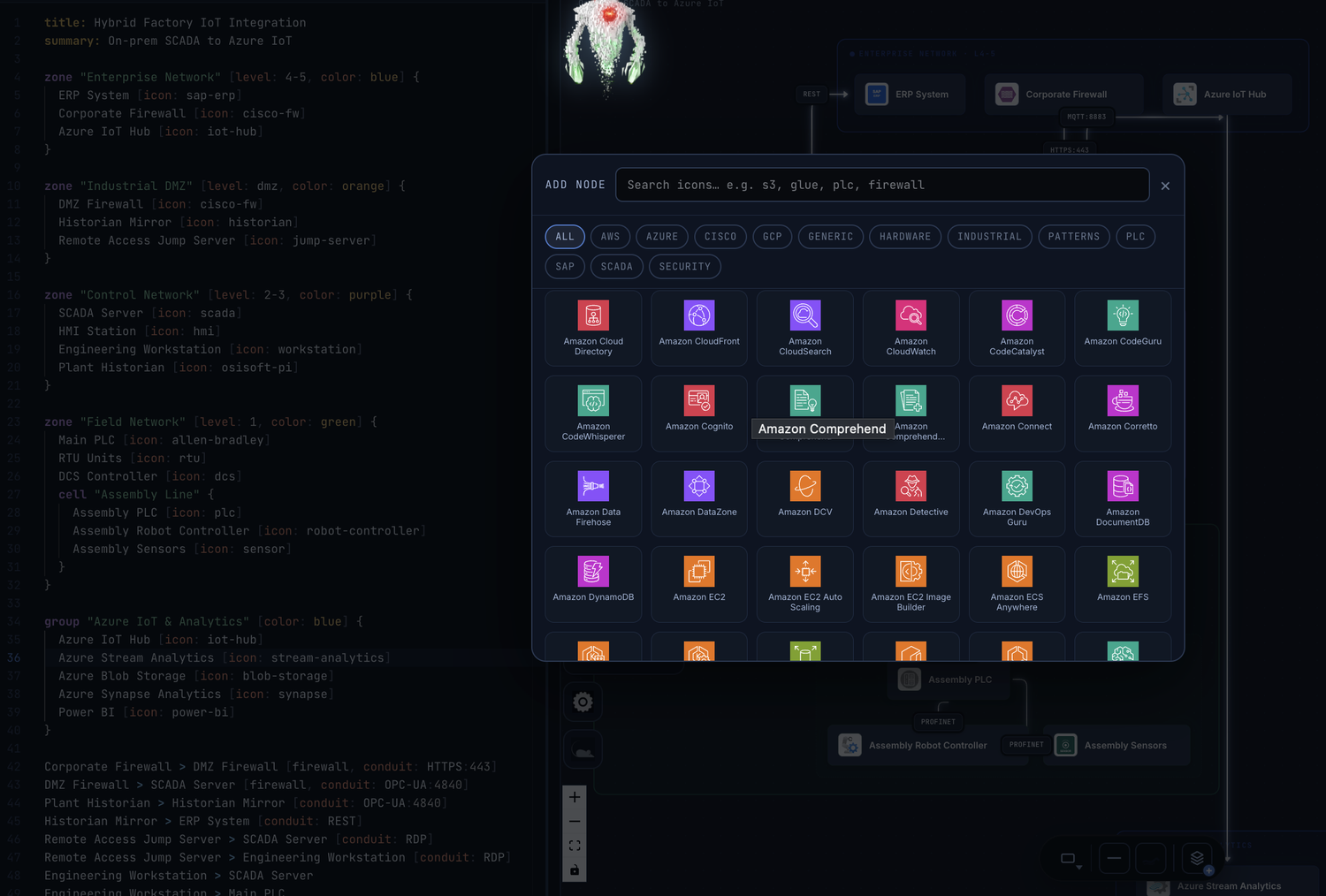
The built-in icon picker — searchable, categorized
ONE SET, EVERY DIAGRAM — twelve categories: AWS · Azure · Cisco · GCP · Generic · Hardware · Industrial · Patterns · PLC · SAP · SCADA · Security.
ERP System [icon: sap-erp]
Corporate Firewall [icon: cisco-fw]
SCADA Server [icon: scada]
Main PLC [icon: allen-bradley]
Plant Historian [icon: osisoft-pi]
Azure IoT Hub [icon: iot-hub]
TWO-WAY BY DESIGN

Edit either side. Both stay in sync.

Change the code and the canvas updates. Drag a node, rename a device, draw or delete an edge — it writes straight back to the code. Most diagram-as-code tools render one way; Basalt is a true round trip.